

 English
 Afrikaans
 Albanian
 Amharic
 Arabic
 Bulgarian
 Chinese (Simplified)
 Chinese (Traditional)
 Croatian
 Dutch
Dutch Filipino
 French
 German
 Greek
Greek Hindi
Hindi Indonesian
 Irish
Irish Italian
 Japanese
 Korean
 Lao
Lao Latin
Latin Nepali
 Persian
 Polish
 Portuguese
 Romanian
 Russian
 Serbian
 Sesotho
 Spanish
 Thai
Thai Turkish
Introduction to Metatrader 4
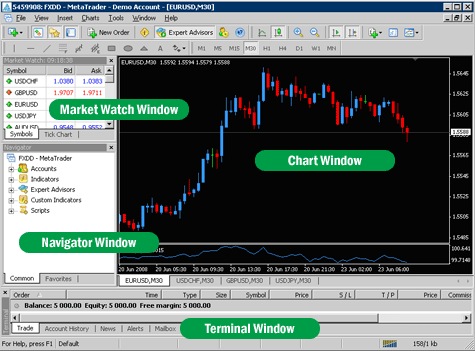
MetaTrader 4 is the most widely used Forex trading platform in the retail Forex world today. It presents users with a multitude of tools which make trading easier, and provides a uniform interface for trading between different brokers. Perhaps MT4’s greatest functional attribute is that it can execute trading robots, called “expert advisors,” automatically without implementation by the user.
In this section we are going to examine the MT4 platform and discuss each of its functional uses.
Figure 1-1 shows the MT4 desktop when you first open it up.
Here is a picture of what the MT4 main screen looks like:

There are some key components of the MT4 platform that you should get familiar with in order to best learn how to use it.
Market Watch Window
The Market Watch Window allows you to view streaming Forex quotes in real time. You can select the Forex pairs that you would like to see in that window, by right clicking on it and selecting the symbols option.
Navigator Window
The navigator window allows you to have quick access to all of your Forex accounts, indicators, scripts and expert advisors.
Chart Window
You can view charts of various currency pairs on the chart window. You are able to view bar, line and candlestick charts. To view an indicator on the chart window, just drag an indicator from the navigator window to your chart. To load an expert advisor, just drag an expert advisor from the navigator window to your chart. More will be explained about this in further sections.
Terminal Window
The terminal window allows for you to view your open positions, the history of your trades, and your MT4 mail.
Lets take a closer look at each item on the screen and briefly discuss what its function is.










Hello mọi người, ai đang tìm trang chơi xanh chín để cày cuốc Đá Gà thì tham khảo trang này nhé. Không lo lừa đảo: https://homemaker.org.in/#. Về bờ thành công.
Hi các bác, bác nào muốn tìm cổng game không bị chặn để gỡ gạc Casino thì vào ngay chỗ này. Tốc độ bàn thờ: Tải Sunwin. Chúc các bác rực rỡ.
Hi cac bac, bac nao mu?n tim trang choi xanh chin d? gi?i tri Tai X?u d?ng b? qua con hang nay. N?p rut 1-1: https://homemaker.org.in/#. Chuc cac bac r?c r?.
Xin chao 500 anh em, n?u anh em dang ki?m ch? n?p rut nhanh d? cay cu?c Tai X?u thi xem th? d?a ch? nay. Dang co khuy?n mai: T?i app Dola789. V? b? thanh cong.