

 English
 Afrikaans
 Albanian
 Amharic
 Arabic
 Bulgarian
 Chinese (Simplified)
 Chinese (Traditional)
 Croatian
 Dutch
Dutch Filipino
 French
 German
 Greek
Greek Hindi
Hindi Indonesian
 Irish
Irish Italian
 Japanese
 Korean
 Lao
Lao Latin
Latin Nepali
 Persian
 Polish
 Portuguese
 Romanian
 Russian
 Serbian
 Sesotho
 Spanish
 Thai
Thai Turkish
Introduction to Metatrader 4
MetaTrader 4 is the most widely used Forex trading platform in the retail Forex world today. It presents users with a multitude of tools which make trading easier, and provides a uniform interface for trading between different brokers. Perhaps MT4’s greatest functional attribute is that it can execute trading robots, called “expert advisors,” automatically without implementation by the user.
In this section we are going to examine the MT4 platform and discuss each of its functional uses.
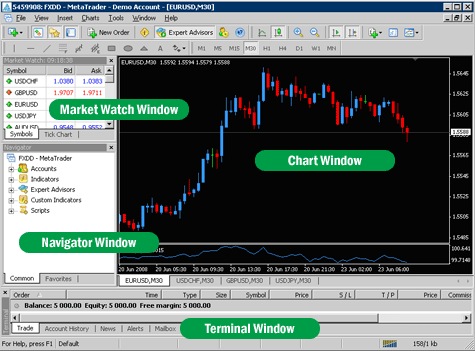
Figure 1-1 shows the MT4 desktop when you first open it up.
Here is a picture of what the MT4 main screen looks like:

There are some key components of the MT4 platform that you should get familiar with in order to best learn how to use it.
Market Watch Window
The Market Watch Window allows you to view streaming Forex quotes in real time. You can select the Forex pairs that you would like to see in that window, by right clicking on it and selecting the symbols option.
Navigator Window
The navigator window allows you to have quick access to all of your Forex accounts, indicators, scripts and expert advisors.
Chart Window
You can view charts of various currency pairs on the chart window. You are able to view bar, line and candlestick charts. To view an indicator on the chart window, just drag an indicator from the navigator window to your chart. To load an expert advisor, just drag an expert advisor from the navigator window to your chart. More will be explained about this in further sections.
Terminal Window
The terminal window allows for you to view your open positions, the history of your trades, and your MT4 mail.
Lets take a closer look at each item on the screen and briefly discuss what its function is.










п»їActually, I found a helpful article about buying affordable antibiotics. It covers how to save money on prescriptions. If you are looking for cheaper alternatives, take a look: п»їlink. Hope it helps.
If you want to save cash on meds, I suggest checking this resource. It shows trusted Mexican pharmacies. Discounted options available here: п»їvisit.
Stop overpaying and save money on prescriptions, you should try reading this resource. It shows prices for generics. Huge savings available here: п»їUpstate Medical.
п»їLately, I found a helpful report regarding generic pills from India. It details CDSCO regulations for generic meds. For those interested in reliable shipping to USA, visit this link: п»їkisawyer.us.com. Good info.